- Product
- Anker Laptop Power Bank 25K
- Capacity
- 25,000mAh / 90Wh
- Max Output
- 100W per USB-C
- Bi Cables
- Yes (2x USB-C)
- TA
- Yes
- Notable Feature
- Per-port wattage display
Best Laptop Power Banks: Ranked by Real Output
Researched by Reed
·16 min read
This article contains affiliate links. We may earn a commission at no extra cost to you. See our disclosure.

Quick Picks
Most laptop power banks are spec-padded for phone users. If your laptop draws 96W under load, a bank rated at 100W is already cutting it close, and anything below 65W will trickle-charge a MacBook Pro rather than actually replenish it. The picks below are selected on sustained output, real-world capacity after voltage conversion losses, and verified testing data, not mAh ratings printed in large font.
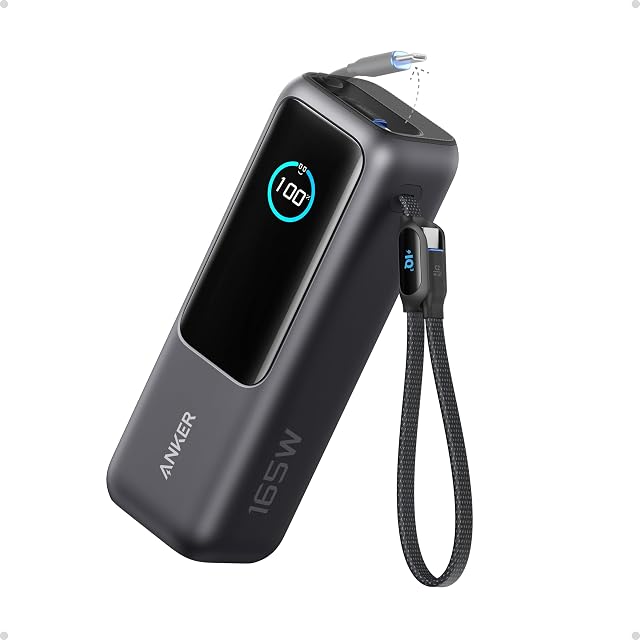
Named 'Best Laptop Power Bank Overall' by Engadget, the Anker 25K earns its place with triple 100W USB-C ports, built-in cables that eliminate the loose-cable problem, a display that shows per-port output wattage, and a 90Wh rated capacity that clears TSA limits. It charged a MacBook Pro meaningfully in 53 minutes of testing. At 100W per port it won't match the Anker Prime's peak output, but for most professionals running a single laptop, it delivers without compromise.
- Product
- Anker Prime 300W
- Capacity
- 26,250mAh
- Max Output
- 300W combined
- Bi Cables
- No
- TA
- Yes
- Notable Feature
- Temperature gauge + Bluetooth app
- Product
- Anker 737 PowerCore 24K
- Capacity
- 24,000mAh
- Max Output
- 140W
- Bi Cables
- No
- TA
- Yes
- Notable Feature
- 16,400+ Amazon reviews
- Product
- UGREEN Nexode 145W
- Capacity
- 25,000mAh
- Max Output
- 145W
- Bi Cables
- No
- TA
- Yes
- Notable Feature
- Best price-to-output ratio at $70
- Product
- UGREEN Nexode 200W
- Capacity
- 25,000mAh
- Max Output
- 200W
- Bi Cables
- No
- TA
- Yes
- Notable Feature
- TFT smart display
- Product
- Goal Zero Sherpa 100AC
- Capacity
- 25,600mAh / 95Wh
- Max Output
- 100W USB-C
- Bi Cables
- No
- TA
- Yes
- Notable Feature
- AC outlet + solar + wireless charging
- Product
- Baseus Blade 100W
- Capacity
- 20,000mAh / 74Wh
- Max Output
- 100W
- Bi Cables
- No
- TA
- Yes
- Notable Feature
- Lightest in 20,000mAh class (just over 1 lb)
- Product
- INIU 25000mAh 100W
- Capacity
- 25,000mAh
- Max Output
- 100W
- Bi Cables
- No
- TA
- Yes
- Notable Feature
- Best price-per-mAh at $50
Laptop Power Bank Reviews
Anker Laptop Power Bank 25K – Best Overall
Anker Laptop Power Bank 25K
Amazon
4.6(7,700 reviews)
- Ports:
- 2x built-in USB-C cables (in/out), 1x USB-C port, 1x USB-A
- Weight:
- ~2 lbs
- Display:
- Yes — charge remaining + output wattage per port
- Capacity:
- 25,000mAh / 90Wh
- Max Output:
- 100W per USB-C port
- Tsa Approved:
- Yes
- Built In Cables:
- Yes — retractable + strap-style
The Anker Laptop Power Bank 25K solves the most annoying problem with carrying a power bank: the cable situation. Two built-in USB-C cables, one retractable and one that doubles as a carrying strap, mean you never need to fish around in your bag mid-meeting. The display is the best in its class, showing remaining charge alongside per-port output wattage simultaneously, a feature Engadget notes as unique among competitors. In lab testing, it charged an iPhone 15 from 5% to 100% in 1 hour 54 minutes and delivered a meaningful 53-minute MacBook Pro boost.
Users in r/UsbCHardware confirmed it supports USB-PD at 15V 3A, which is relevant for Microsoft Surface users who need that specific voltage profile. The ceiling here is 100W per port: sufficient for most thin-and-light laptops and MacBook Pro 14", but below the 140W threshold that MacBook Pro 16" users and high-wattage laptop owners should target. If you're running a single work laptop and want the most integrated carry setup in the category, this is the pick.
What we like
- Two built-in USB-C cables (one retractable, one doubles as carrying strap) eliminate need to carry extra cables
- Display shows both remaining charge and per-port output wattage – unique among competitors
- Charged iPhone 15 from 5–100% in 1h 54m in Engadget testing
- Delivers fast charge to MacBook Pro (53 min boost in testing)
- Flight-approved; triple 100W USB-C ports support multi-device use
Worth knowing
- Screen surface gets marred/scratched over time (noted in Engadget review)
- 100W max per port is lower than Anker Prime (140W) or UGREEN 145W/200W
- At $120, more expensive than UGREEN 145W at $70
Anker Prime Power Bank (26,250mAh, 300W) – Best Premium
Anker Prime Power Bank (26,250mAh, 300W)
Amazon
4.7(734 reviews)
- Ports:
- 2x USB-C (140W each), 1x USB-A (22.5W)
- Display:
- Yes — charge, output, and temperature gauge
- Capacity:
- 26,250mAh
- Max Output:
- 300W combined
- App Control:
- Yes — Bluetooth app connectivity
- Tsa Approved:
- Yes
- Optional Charging Base:
- $110 add-on
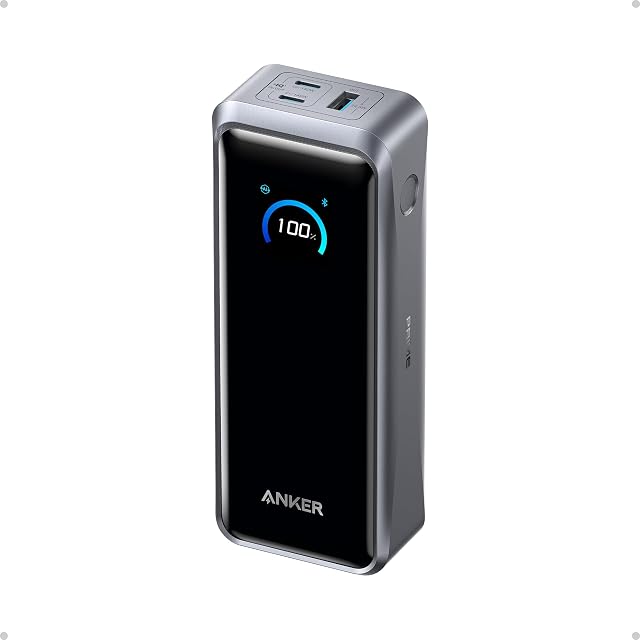
The Anker Prime is the only power bank in this roundup with a temperature gauge on its display, and at 300W combined output across two 140W USB-C ports, it's the only one that can sustain simultaneous full-speed charging of two power-hungry laptops. Engadget's lab testing clocked it recharging a MacBook Pro from 10% to 75% in approximately 45 minutes, the fastest result of any power bank tested. For users in r/UsbCHardware managing high-draw use cases like Starlink Mini setups, the 140W per-port output and Anker's reliability track record made it the consistent recommendation.
The pricing structure deserves scrutiny. The bank itself sits at the top of the Anker lineup, and the optional charging dock adds another $110 on top of that. Engadget's reviewer characterized the Bluetooth app connectivity as 'more novelty than practical,' which is a fair read for anyone hoping it adds meaningful utility over glancing at the display. If you're charging two laptops simultaneously on a recurring basis, the 300W output justifies the premium. For single-device use, the 25K does the job at a lower outlay.
What we like
- Fastest MacBook Pro recharge of any tested power bank – 10% to 75% in ~45 minutes (Engadget lab test)
- 300W combined output supports two high-powered laptops simultaneously
- Temperature gauge on display adds safety monitoring – unique feature
- Bluetooth app monitoring for power management
- More compact than most 27,000mAh batteries despite 26,250mAh capacity
Worth knowing
- Highest price in the Anker lineup – $171 without base, $280+ with optional charging dock
- Optional charging base ($110 extra) needed for the most convenient recharging workflow
- App connectivity is 'more novelty than practical' per Engadget reviewer
Anker 737 Power Bank (PowerCore 24K) – Most Proven at 140W
Anker 737 Power Bank (PowerCore 24K)
Amazon
4.4(16,400 reviews)
- Ports:
- 2x USB-C, 1x USB-A
- Display:
- Yes — smart display
- Capacity:
- 24,000mAh
- Max Output:
- 140W
- Tsa Approved:
- Yes
The Anker 737 matters for one specific reason: 140W output. That number is significant because it matches the standard charger output for the MacBook Pro 16", meaning this bank can sustain full-speed charging without negotiating down to a slower profile. With 16,400+ Amazon reviews, it also has the most field-validated track record of any laptop power bank in this category. Users in r/UsbCHardware specifically highlighted it for fast recharge speed during lunch-break charging scenarios.
One data point worth flagging: a discussion in r/UsbCHardware noted that Anker's newer 165W model with built-in cables was 'quite a bit worse' than the 737, suggesting the 737 remains the preferred option in the 140W tier despite being the older design. No built-in cables and 24,000mAh rather than 25,000mAh are the only meaningful concessions versus the 25K, and neither is disqualifying at its price point.
What we like
- Praised on r/UsbCHardware for fast recharge speed – highlighted in a thread comparing 10 laptop power banks for 'lunch break' recharging
- 140W output meets MacBook Pro 16" standard charger output threshold
- Highest review count (16,400+) of any laptop power bank on Amazon – reflects long-term market trust
- Smart display shows real-time power data
Worth knowing
- Anker's newer 165W model with built-in cables was noted as 'quite a bit worse' than the 737 in r/UsbCHardware discussion, suggesting 737 remains the preferred Anker 140W option
- No built-in cables unlike newer Anker 25K model
- Slightly lower capacity than 25,000mAh competitors

UGREEN Nexode Power Bank 25,000mAh 145W – Best Value at High Wattage

UGREEN Nexode Power Bank 25,000mAh 145W
Amazon
4.4(6,000 reviews)
- Ports:
- 2x USB-C, 1x USB-A
- Weight:
- Compact form factor
- Display:
- Yes — digital display
- Capacity:
- 25,000mAh
- Max Output:
- 145W
- Tsa Approved:
- Yes
The UGREEN Nexode 145W clears the 140W threshold, carries 25,000mAh, and costs less than competing banks at comparable wattage. In Engadget testing, it charged an iPhone 15 from 4% to full in approximately 1.5 hours, among the fastest phone charge speeds in the test group. CNN Underscored recommends it specifically for laptops and tablets. At its price point, it undercuts the Anker 737 at the same 140W+ threshold, which is why r/UsbCHardware users flag it as the high-wattage value option.
The caveats are minor but real. No built-in cables, and Engadget notes occasional stock availability issues. Users in r/UsbCHardware compared it directly against Anker and INIU alternatives, with some preferring Anker for long-term support confidence. If you're making a purely technical buying decision on wattage-per-dollar and both brands are in stock, the UGREEN 145W is difficult to argue against.
What we like
- Charged iPhone 15 from 4% to full in ~1.5 hours – among fastest phone charge speeds in Engadget testing
- 145W output exceeds MacBook Pro 16" standard charger (140W) for faster laptop charging
- Best price-to-performance at $70 – significantly cheaper than Anker 737 ($110) at comparable output
- Amazon Choice designation; recommended by CNN Underscored for laptops/tablets
Worth knowing
- No built-in cables
- Only three ports (2 USB-C + 1 USB-A) – fewer than Goal Zero Sherpa
- Engadget notes occasional in-stock availability issues
UGREEN Nexode Power Bank 25,000mAh 200W – For Higher-Draw Laptops
UGREEN Nexode Power Bank 25,000mAh 200W
Amazon
4.5(2,000 reviews)
- Ports:
- Multiple USB-C + USB-A
- Display:
- Yes — TFT smart display
- Capacity:
- 25,000mAh
- Max Output:
- 200W
- Tsa Approved:
- Yes
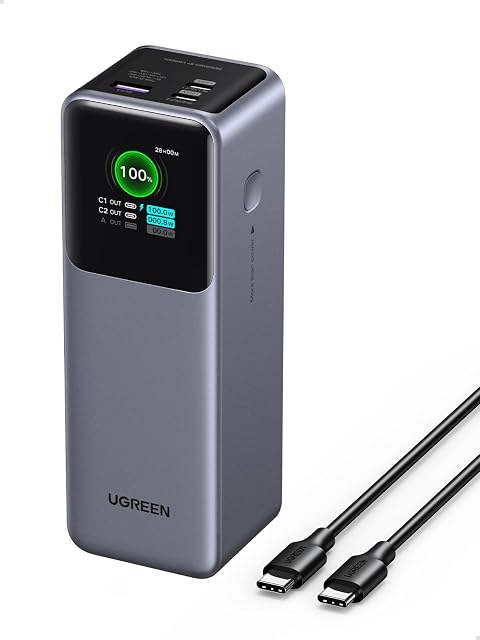
The UGREEN Nexode 200W steps up from the 145W model for users running laptops that draw more than 140W. The 200W combined output and TFT smart display are the headline specs. The tradeoff is clear: you pay incrementally more than the 145W model for headroom that most MacBook and thin-and-light users won't saturate, but that a Dell XPS 15, Lenovo ThinkPad with discrete GPU, or any 16" gaming-adjacent laptop might actually use.
The review count (around 2,000) is notably lower than the 145W model's 6,000+, so it has less long-term field data behind it. For most professional users, the 145W model is the better-validated choice. The 200W makes sense specifically if you know your laptop's USB-PD charging profile calls for more than 140W.
What we like
- 200W max output is among the highest in the consumer laptop power bank category
- TFT smart display provides detailed charge information
- Steps up from 145W model for users with higher-wattage laptops
Worth knowing
- Fewer reviews (2,000) vs 145W model (6,000) – less proven long-term
- No built-in cables
- $20 more than the 145W model for incremental wattage improvement most users won't notice
Goal Zero Sherpa 100AC – Best for Field Work and Outdoor Use

Goal Zero Sherpa 100AC
Amazon
4.4(202 reviews)
- Ports:
- 3x USB-C (1 input only), 2x USB-A, 1x AC outlet, 1x 8mm solar/12V input, wireless charging pad
- Display:
- Yes — toggleable status display
- Capacity:
- 25,600mAh / 95Wh
- Ac Outlet:
- Yes
- Max Output:
- 100W USB-C
- Solar Input:
- Yes — via 8mm port (Goal Zero solar panels, sold separately)
- Car Charging:
- Yes — 12V adapter cable ($40 extra)
- Internal Fan:
- Yes
The Goal Zero Sherpa 100AC is the only power bank in this group designed around multiple input sources: USB-C, an 8mm solar port (compatible with Goal Zero solar panels), and a 12V car adapter input. It also has a wireless charging pad on top and an internal cooling fan to prevent thermal throttling under multi-port load. Engadget clocked it charging a MacBook Pro from 6% to 72% in 1 hour 21 minutes, a solid result for a 100W-output bank. The aluminum unibody construction is appropriate for field technicians who aren't babying their gear.
One critical note from Engadget testing: the AC outlet should not be used for laptops. Routing power through the AC port forces double voltage conversion (DC to AC, then back to DC through your laptop adapter), which wastes energy and reduces effective output. Use the USB-C ports for laptop charging and reserve the AC outlet for devices that genuinely have no USB-C option. At $249.95 before solar panels ($250+) or car adapter ($40), this is a purpose-built tool for outdoor or vehicle-based work, not a commuter power bank.
What we like
- AC outlet + solar input + car 12V charging = most versatile power source options in the category
- Charged MacBook Pro from 6% to 72% in 1h 21m in Engadget testing
- Rugged aluminum unibody design for field work and outdoor use
- Internal cooling fan prevents overheating under heavy multi-port load
- Wireless charging pad on top in addition to multiple wired ports
Worth knowing
- Most expensive laptop power bank tested at $249.95 – nearly 2x the price of Anker 25K
- Solar panels add another $250+ and car charger another $40
- At 100W USB-C max, lower output than UGREEN 145W or Anker Prime 300W
- Fewer reviews (202) for the price – less community validation
- Engadget notes AC outlet should NOT be used for laptops – inefficient double voltage conversion
Baseus Power Bank 20000mAh 100W Blade – Best for Weight-Conscious Travelers

Baseus Power Bank 20000mAh 100W (Blade)
Amazon
4.4(310 reviews)
- Ports:
- 2x USB-C in/out, 2x USB-A out
- Weight:
- Just over 1 lb — lightest in its capacity class (Engadget)
- Display:
- Yes — underestimates remaining charge (conservative)
- Capacity:
- 20,000mAh / 74Wh
- Max Output:
- 100W
- Form Factor:
- Flat/tablet-shaped
The Baseus Blade is the lightest option in the 20,000mAh class according to Engadget, coming in at just over 1 lb, and its flat, tablet-like shape is designed to slide alongside a laptop in a sleeve without creating a lump. In Engadget's lab test, it charged a MacBook Pro from 10% to 62% in 1 hour 6 minutes at 100W. The display reads conservatively, consistently underestimating remaining charge, which means you'll typically get a few extra percentage points past the 1% readout. Small rubber feet prevent it from sliding around when plugged in, which is a minor but genuinely useful detail.
The 20,000mAh capacity is the constraint to understand here. Due to voltage conversion losses during discharge, a 20,000mAh bank delivers noticeably less total laptop charge than a 25,000mAh unit, roughly 20 percentage points less on a MacBook Pro by Engadget's framing. If weight is your primary constraint and you don't need to fully recharge your laptop twice over, the Blade is well-suited. If you need maximum charge delivery per trip, move up to a 25,000mAh bank.
What we like
- Flat, tablet-like shape slides alongside a laptop in a backpack – lightest in 20,000mAh class per Engadget
- Charged MacBook Pro from 10% to 62% in 1h 6m in Engadget testing
- Display underestimates charge conservatively – battery delivers a few extra percentage points at 1%
- Little rubber feet prevent sliding when plugged in – practical design detail
- Great value for compact form factor
Worth knowing
- 20,000mAh capacity delivers ~20 percentage points less MacBook charge than 25,000mAh competitors
- Newer brand – fewer reviews than Anker equivalents
- $90 price is competitive but Anker 737 at $110 offers 140W vs 100W
INIU Power Bank 25000mAh 100W – Best Budget Option

INIU Power Bank 25000mAh 100W
Amazon
4.5(5,400 reviews)
- Ports:
- 3x output (USB-C + USB-A mix)
- Display:
- Yes
- Capacity:
- 25,000mAh
- Max Output:
- 100W USB-C
- Tsa Approved:
- Yes
The INIU 25000mAh 100W delivers the best price-per-mAh in this category at $50 for 25,000mAh. With 5,400+ reviews at 4.5 stars, it has meaningful community validation for a budget-tier option. Users in r/UsbCHardware specifically recommended it over Anker for price-to-wattage ratio, and one user was evaluating INIU's 140W 27K model for its screen and price advantage over UGREEN and Anker alternatives.
The 100W ceiling is the limiting factor. If your laptop's USB-PD profile tops out at 100W or below, that's a non-issue. If you're running a MacBook Pro 16" or any laptop with a 140W+ charger, this bank will charge it, but at a reduced rate. For MacBook Air, MacBook Pro 14", and most Windows ultrabooks, 100W is more than adequate and the price is difficult to beat.
What we like
- Best price-per-mAh in the category at $50 for 25,000mAh
- 5,400+ reviews with 4.5★ – strong community validation for a budget option
- Recommended in r/UsbCHardware as top value pick – users prefer it over Anker for price/wattage ratio
- 100W output handles most laptop charging needs
Worth knowing
- 100W max output is lower than UGREEN 145W at comparable price tier
- No built-in cables
- Lesser brand recognition than Anker for warranty/support confidence
Also Worth Considering
The following power banks are newer to market, have fewer than 500 reviews, or lack independent lab testing data. They may be worth watching, but the research reviewed didn't include enough long-term field data to write a full recommendation.
UGREEN Nexode 165W with Built-in Cables

UGREEN Nexode Power Bank 25,000mAh 165W (Built-in Cables)
Amazon
4.6(284 reviews)
- Ports:
- 2x built-in USB-C cables + additional ports
- Display:
- Yes
- Capacity:
- 25,000mAh
- Max Output:
- 165W
- Tsa Approved:
- Yes
- Built In Cables:
- Yes — 2x USB-C
The UGREEN Nexode 165W built-in cables model offers dual built-in USB-C cables and 165W output, but with only 284 reviews it's too new to evaluate against the established 145W or Anker 737 in the same tier. Users in r/UsbCHardware flagged built-in cable durability as a category-wide concern.
INIU Portable Charger 20000mAh 65W

INIU Portable Charger 20000mAh 65W Compact
Amazon
4.4(4,500 reviews)
- Ports:
- 3x output
- Capacity:
- 20,000mAh
- Max Output:
- 65W USB-C PD
- Form Factor:
- Compact
- Tsa Approved:
- Yes
The INIU 65W compact at $38 is the most affordable entry into laptop-adjacent charging, with 4,500+ reviews validating it as a school and light work backup option. At 65W, it will charge a MacBook Air or thin-and-light ultrabook, but it is insufficient for MacBook Pro 16" or any laptop requiring 140W+ sustained input.
EF EcoFlow Rapid Power Bank 25000mAh 170W

EF ECOFLOW Rapid Power Bank 25000mAh 170W
Amazon
4.5(91 reviews)
- Ports:
- 2x USB-C (140W each), additional ports
- Display:
- Yes — TFT screen
- Capacity:
- 25,000mAh
- Max Output:
- 170W total
- Tsa Approved:
- Yes
The EcoFlow Rapid 170W carries dual 140W USB-C ports and a TFT screen, bringing EcoFlow's power station background to the portable bank category. At only 91 reviews, there's no meaningful long-term data yet; the $95 price point also puts it in direct competition with the UGREEN 145W, which has 6,000+ reviews behind it.
CUKTECH 15 SE Power Bank 20000mAh 65W

CUKTECH 15 SE Power Bank 20000mAh 65W
Amazon
4.6(919 reviews)
- Ports:
- 3x USB-C output
- Display:
- Yes — accurate digital display
- Capacity:
- 20,000mAh
- Max Output:
- 65W USB-C PD 3.0
- Tsa Approved:
- Yes
The CUKTECH 15 SE earns the highest star rating in the budget segment at 4.6 stars from 919 reviews, and the CUKTECH brand is praised in r/UsbCHardware for accurate display readings and low voltage ripple. The 65W ceiling limits it to lighter laptops.
AsperX Laptop Power Bank 165W 20000mAh

AsperX Laptop Power Bank 165W 20000mAh
Amazon
4.4(307 reviews)
- Build:
- Aluminum alloy unibody
- Ports:
- Retractable USB-C cables built-in
- Capacity:
- 20,000mAh
- Max Output:
- 165W
- Tsa Approved:
- Yes
The AsperX 165W claims the highest wattage-to-size ratio in the budget tier with an aluminum alloy unibody and built-in retractable cables at $57. With only 307 reviews and no independent lab testing data in the research reviewed, sustained output versus rated peak is an open question.
Portable Power Bank 100W with AC Outlet 27000mAh

Portable Power Bank 100W AC Outlet 27000mAh
Amazon
4.2(245 reviews)
- Ports:
- AC outlet + USB-C + USB-A
- Capacity:
- 27,000mAh / 98Wh
- Ac Outlet:
- 100W 110V AC
- Tsa Approved:
- Yes (under 100Wh)
- Usb C Output:
- 65W PD USB-C
The AC Outlet 27000mAh bank reaches near-maximum TSA-legal capacity at 98Wh and adds a 100W 110V AC outlet. The AC outlet is useful for devices without USB-C options, but Engadget specifically warns against using any power bank AC outlet for laptop charging due to the energy waste from double voltage conversion. Use the 65W USB-C PD port for laptops.
Lenovo 140W Power Bank 25000mAh
Lenovo 140W Power Bank 25000mAh
Amazon
4.7(24 reviews)
- Ports:
- 3-port (USB-C + USB-A hybrid)
- Display:
- Yes — TFT display
- Capacity:
- 25,000mAh
- Max Output:
- 140W
- Tsa Approved:
- Yes
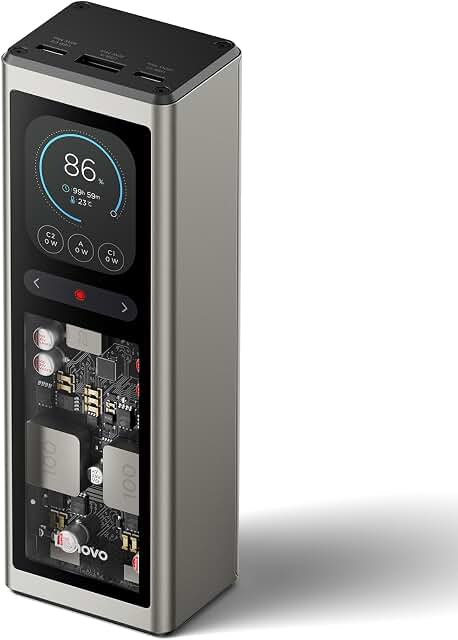
The Lenovo 140W offers brand-matched appeal for ThinkPad and ThinkBook users, with 140W output at $80, undercutting the Anker 737 at the same wattage. At only 24 reviews, it's extremely new; Lenovo's power bank track record is unproven relative to Anker or UGREEN specialists.

How to Choose a Laptop Power Bank
The 140W Threshold: Why Wattage Matters More Than mAh
The single most important number on a laptop power bank's spec sheet is its maximum USB-PD output wattage, not its mAh rating. For MacBook Pro 16" users, 140W is the threshold: that's the output of Apple's standard charger for that machine. A 100W bank will charge a MacBook Pro 16", but the laptop's power management will negotiate down to a lower charging rate, which means slower top-up speeds and potential battery drain under heavy CPU load. MacBook Pro 14", MacBook Air, and most Windows ultrabooks are fine at 100W. Gaming-adjacent laptops with discrete GPUs may need the 200W tier.
If you're unsure of your laptop's charging profile, check the wattage printed on your OEM charger. That number is the ceiling you want to match or exceed in a power bank. Anything under your charger's rated output will charge your laptop more slowly and may not prevent battery drain if the machine is under load.
mAh vs. Wh: What the Ratings Actually Mean for Laptop Charging
mAh (milliamp-hours) is measured at the power bank's internal battery voltage, typically 3.6V or 3.7V. Your laptop battery operates at a much higher voltage, which means voltage conversion happens during discharge. That conversion isn't lossless. As Engadget's testing illustrates, a 25,000mAh bank realistically delivers roughly 60% of a MacBook Pro's total battery due to these losses. So a bank marketed as '5x your phone capacity' may charge your laptop only once, or a little more.
Watt-hours (Wh) is the more useful unit for laptop charging comparisons, because it accounts for voltage. The TSA's 100Wh limit is stated in Wh for exactly this reason.
TSA Rules and Airline Restrictions
The TSA's baseline limit is 100Wh for lithium-ion power banks in carry-on baggage, with airline approval possible for banks between 100Wh and 160Wh. Power banks must travel in carry-on, never checked luggage. Most banks in this roundup are at or under 100Wh: the Anker 25K is 90Wh, the Goal Zero Sherpa is 95Wh, and the Baseus Blade is 74Wh. The 27,000mAh AC outlet bank is 98Wh, clearing the standard limit.
However, TSA rules are only the floor. Engadget notes that 2025 saw additional restrictions from specific carriers and airports, including Emirates, Southwest, Hong Kong airport, Delta, and KLM, due to battery-related incidents. Before traveling internationally, check your airline's current policy directly, as individual carrier restrictions can be stricter than TSA's baseline. The research reviewed didn't include a carrier-by-carrier breakdown of current policies, so consult your airline for the latest specifics.
Built-in Cables vs. Separate Cables
Built-in cables reduce the total carry load and eliminate the risk of forgetting a cable, but they introduce a durability variable. Users in r/UsbCHardware flagged cable longevity as a category-wide concern: a damaged built-in cable on the bank's primary output port is harder to address than swapping a separate cable. The research reviewed didn't include long-term durability data on built-in cable models specifically, so this is a known gap. If you buy a built-in cable model, treat cable stress points with care and avoid sharp bending at the connector.
The AC Outlet Efficiency Trap
Power banks with AC outlets look appealing for laptop users who want plug-and-forget compatibility with their existing laptop adapter. The problem is the conversion chain: the power bank stores energy as DC, converts it to AC for the outlet, then your laptop adapter converts it back to DC. Each conversion loses energy. Engadget's testing explicitly warns against using AC outlets for laptop charging for this reason. If your laptop has a USB-C charging port, use it directly with the USB-C output on your power bank. Reserve the AC outlet for devices with no USB-C option.
Passthrough Charging and Multiple-Port Behavior
Passthrough charging allows a power bank to simultaneously accept input (charging itself) while delivering output to connected devices. Most current laptop power banks support this, but the combined current draw affects both input and output speeds. On multi-port use, total output is typically shared across active ports rather than additive.
The Anker Prime's 300W combined rating is the total ceiling across all ports – both USB-C ports can deliver up to 140W each, with the remaining headroom from the USB-A port. Check the spec sheet for combined vs. per-port wattage when evaluating multi-device scenarios.
Frequently Asked Questions
- How many times can a laptop power bank charge my MacBook Pro?
- Fewer times than the mAh math suggests. Due to voltage conversion losses during discharge, a 25,000mAh bank realistically delivers roughly 60% of a MacBook Pro's total battery capacity, according to Engadget's testing. That means most 25,000mAh banks will fully charge a MacBook Pro once, with some charge remaining. Watt-hours (Wh) gives a more accurate picture: a 90Wh bank will deliver less than one full charge of a MacBook Pro after conversion losses.
- What wattage do I need in a power bank to charge my laptop?
- Match or exceed the wattage on your OEM laptop charger. MacBook Air and most ultrabooks charge at 65W to 96W, so a 100W bank handles them without issue. MacBook Pro 16" uses a 140W standard charger, so 140W is the target threshold for full-speed charging. Laptops with discrete GPUs may need 200W or more at the wall, though USB-PD delivery over a power bank may differ from AC wall delivery. A bank below your charger's rated wattage will still charge your laptop, just more slowly.
- Are laptop power banks allowed on planes?
- Yes, within limits. The TSA requires lithium-ion power banks to travel in carry-on luggage, never checked baggage. Banks up to 100Wh are permitted without airline approval. Banks between 100Wh and 160Wh require airline approval. Most laptop power banks in this roundup fall under 100Wh. Note that individual airlines may impose stricter restrictions beyond TSA's baseline rules.
- Which airlines have extra restrictions on power banks beyond TSA rules?
- Engadget notes that 2025 brought additional restrictions from Emirates, Southwest, Delta, KLM, and Hong Kong airport, among others, following battery-related incidents. The research reviewed did not include a comprehensive carrier-by-carrier policy breakdown, so check directly with your airline before flying, especially on international routes.
- What is the difference between mAh and Wh for power banks?
- mAh is measured at the power bank's internal battery voltage (typically 3.6V to 3.7V). Wh equals mAh multiplied by voltage divided by 1,000, and represents the actual energy stored. Because laptops operate at higher voltages than the bank's internal cells, voltage conversion happens during discharge and energy is lost in that process. Wh is the more meaningful unit for comparing power banks intended for laptop use, and it's the unit airlines and regulators use for carry-on limits.
- Is it efficient to charge a laptop through a power bank's AC outlet?
- No. Engadget explicitly warns against this practice. A power bank stores energy as DC, then converts it to AC for the outlet, and your laptop's power adapter converts it back to DC again. Each conversion step wastes energy. If your laptop has a USB-C charging port, use the bank's USB-C output directly. Reserve the AC outlet for devices with no USB-C option.
- What does pass-through charging mean on a power bank?
- Passthrough charging is a feature that allows a power bank to accept input (charging itself) while simultaneously delivering output to your connected devices. Most current laptop power banks support this, but the combined current draw affects both input and output speeds. When using multiple ports, total output is shared across active ports rather than additive, so check your bank's spec sheet for combined vs. per-port wattage ratings.
- What is the maximum watt-hours allowed on a plane?
- TSA permits lithium-ion batteries up to 100Wh in carry-on baggage without approval. Between 100Wh and 160Wh requires airline approval. Above 160Wh is prohibited in carry-on for consumer batteries. Power banks must travel in carry-on, never checked luggage. Individual airlines may set lower limits.
- Can a 65W power bank charge a MacBook Pro?
- Yes, but slowly. A 65W bank will charge a MacBook Pro, but power delivery will be negotiated down from the laptop's preferred charging rate. Under heavy CPU or GPU load, a 65W bank may not fully overcome discharge – the laptop may charge slowly or hold battery level rather than gain charge. For MacBook Pro users, 100W is a practical minimum and 140W is the target for full-speed USB-PD charging.
- How long does it take to recharge a laptop power bank itself?
- Recharge time varies significantly by bank and input wattage. The Anker 737 was specifically called out in r/UsbCHardware for fast recharge speed during lunch-break scenarios. The Anker Prime, with its 140W per-port input capability, supports faster self-recharging than banks limited to 45W or 65W input. Check the bank's max input wattage alongside output – a bank with a high output ceiling but low input ceiling will take much longer to top up.
- Should I buy a power bank with built-in cables or separate cables?
- Built-in cables reduce carry burden and eliminate forgotten-cable scenarios. The tradeoff is long-term durability: if a built-in cable fails at the stress point, the bank's primary output method is compromised in a way a cable swap can't fix. Users in r/UsbCHardware flagged this as a category concern. The research reviewed didn't include long-term durability testing data on built-in cable models. If you choose a built-in cable model, avoid sharp bends at the connector and treat cable terminations carefully.
- What is USB Power Delivery (PD) and why does it matter for laptop charging?
- USB-PD is a charging protocol that negotiates voltage and current between a power bank and a connected device. Instead of delivering a fixed output, a USB-PD bank and a USB-PD device handshake to agree on the highest safe charging rate both support. For laptops, this means the bank can deliver 65W, 100W, or 140W depending on what the laptop requests and what the bank can provide. Without USB-PD, a power bank defaults to lower, fixed-voltage output that won't fast-charge a laptop. All serious laptop power banks in this roundup use USB-PD.
- What is the difference between a laptop power bank and a portable power station?
- Portable power stations (like EcoFlow's larger units or the Jackery range) typically carry far more energy, often 500Wh to 2,000Wh, and output through AC outlets at meaningful wattage. They are not TSA-legal for carry-on air travel. Laptop power banks are lithium-ion cells in the 74Wh to 100Wh range optimized for USB-PD output and airline compliance. The Goal Zero Sherpa 100AC sits at the boundary, with AC outlet functionality and 95Wh rated capacity, but its AC output is limited to 100W, far below what a true power station delivers.
- Can a laptop power bank charge a gaming laptop?
- It depends on the laptop's charging requirements and whether it accepts USB-C input. Many gaming laptops use proprietary charging connectors and do not accept USB-C power at all. Those that do accept USB-C PD often need 140W or more for full-speed charging. The 200W UGREEN Nexode would be the highest-output option in this roundup for that use case, though the research reviewed did not include specific gaming laptop charge testing data.
- Does using multiple ports on a power bank slow down charging speeds?
- Generally yes. Total output wattage is shared across active ports. A bank rated at 300W combined, like the Anker Prime, can deliver up to 140W per USB-C port, but the combined ceiling applies. Adding a third device drawing power will reduce the allocation to connected devices. For best per-device speeds, use only the ports you need.
Related articles
